
See what your business command center should show.
Building your own dashboard? Start from one that works. Click through business dashboard examples for eleven industries, then build yours with Claude Code using our guide, or have it done for you.
Two dashboards are free to open, no sign-up.
Inside the library
- 162 screens
- 37 roles
- 150 ideas
- 10 industries
- Owner, manager and team views for every business
- Desktop, tablet and phone sizes of every screen
- Why each part is there, in plain words
- New industries as they ship, at no extra cost
What these 162 screens would cost you
Build it yourself with Claude Code. A step-by-step guide from any dashboard here to a working prototype on your own computer.
Launch price. after .
Get full access* At $1,500 for 12 screens, the lowest freelance rate we found for dashboard design. Planning sessions and done-for-you builds are quoted separately.
Business dashboard examples by industry
Pick your industry, then switch between the owner, the manager and the team.
Every title is free to read. The full ideas and the dashboards behind them open with access. Get access for $149
| Open |
|---|
No ideas match
Try another category, industry or role, or clear the filters.
Nothing matches yet
Try another industry or role, or clear the filters.
How it works
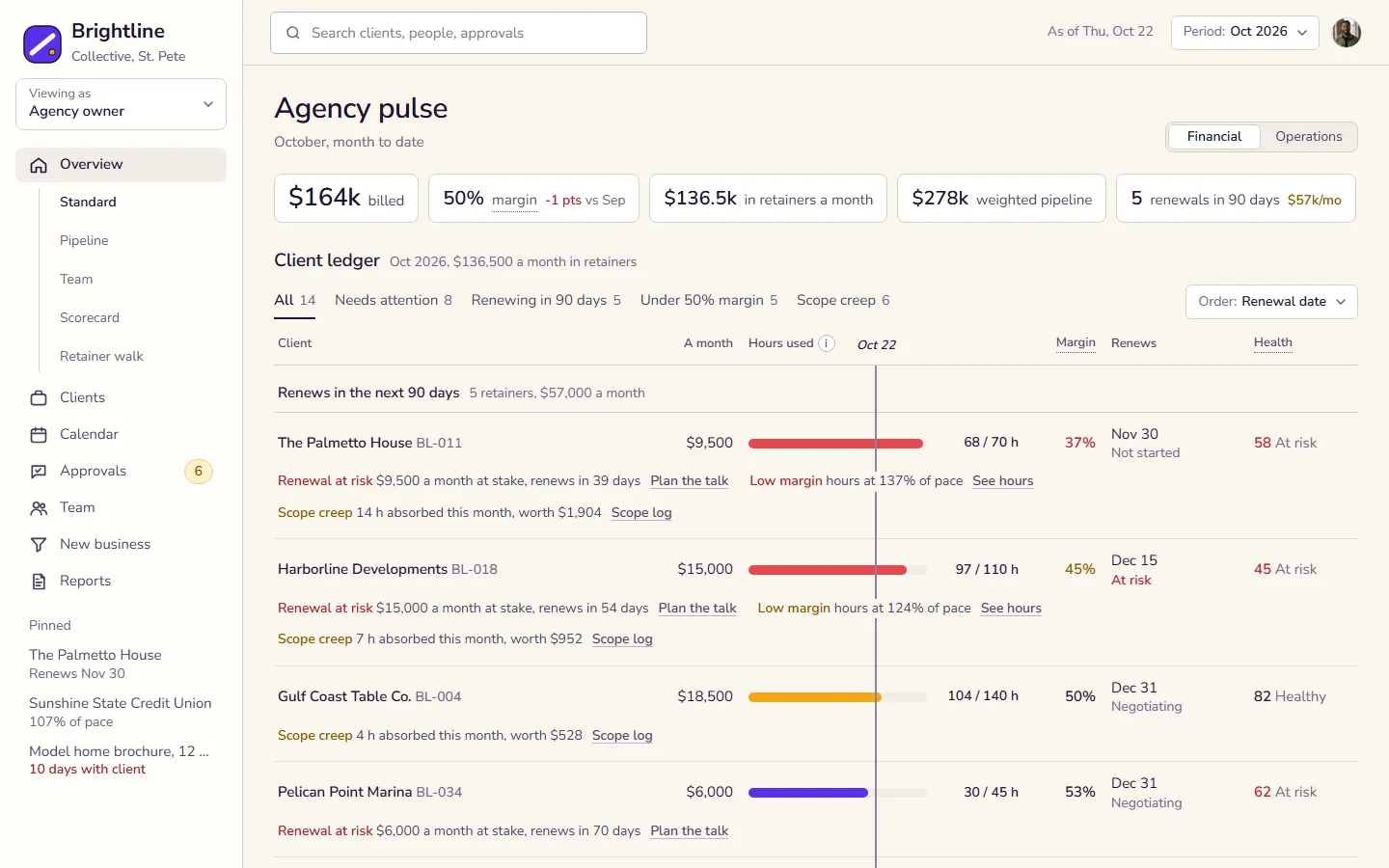
Open a dashboard for your kind of business, switch roles and read why each part is there. These three come from the marketing agency.
-
One home screen per role
Switch the role with Viewing as, under the company name. The owner reads the client ledger, the account director sees only their own clients, and the project manager sees this week's deliverables as a tick list.
Read more -
Financial and operations views for the owner
The owner's overview is a client ledger, one row per client, grouped by when the retainer renews. The switch in the heading reads the same rows for the money or for the work: deliverables, approvals waiting on the client and who is booked.
Read more -
Margin by client, lowest first
Margin sits on every row, plain at the 50% target and amber or red when it misses, so a costly client stands out without a chart. Order by Margin or open the Under 50% margin tab to see them first.
Read more
Two ways to get your command center
Build it yourself from the library, or have it planned and built for you.
Build it yourself
$149, one payment
Pick your starting point
Open the dashboard closest to your business and see what each role checks first.
Build it with Claude Code
Follow the guide to turn that design into a working prototype on your own computer.
Make it yours
Swap in your own numbers, tools and screens as the business grows.
Done for you
Starts with a planning session
Planning session
One call about how your business runs: the numbers you check, who needs which screen and where the data lives today.
Your plan
A screen-by-screen plan for each role, starting from the dashboard here that fits your business.
Built for you
We build it on your real numbers and connect the tools and spreadsheets you already use.
Coming next
New industries are added as they ship. Tell us which one you need first.
Questions
What happens in a planning session?
One call about how your business runs: what you check every day, who needs to see what and where the numbers live now. You leave with a plan for your command center, whether we build it or you do.
Can you build it for my business?
Yes. After the planning session we build it on your real data and connect the tools you already use. Book a planning session.
I'm building my own. How does this help?
You start from a dashboard that already works for your kind of business, not a blank page. Full access includes a step-by-step guide to building it with Claude Code on your own computer, and each idea says why that part is there.
Do I need to be technical to use the guide?
No. It's written for business owners, not developers, and walks you through Claude Code one step at a time. Rather not build it yourself? Book a planning session.
Is this software I can sign up for?
Not as it is. Every company, person and number here is made up, so you can see how a command center works before you plan your own.
What does full access include?
Every dashboard, role and idea in the library, including the dashboards added later, plus the guide to building yours with Claude Code. $149, one payment. Get full access.
I already paid. How do I get in?
Use the access code from your receipt email on the access page.
Ready for your command center?
Build it yourself with Claude Code, or have it done for you.